 Skip to content
Can You Play PS2 Games on PS3?
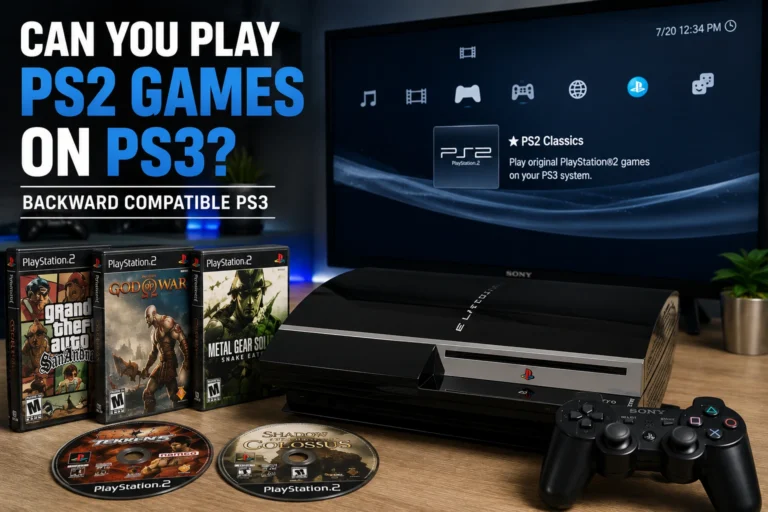
Yes, some PS3 models can play original PS2 games, but support depends entirely on the console version you own. If you are wondering can PS3 play PS2 games? The answer depends on which PS3 model you own.
Early PS3 models included backward compatibility for PS2 discs, while later versions removed this feature completely. Because of this, checking the model number is very important before buying or using a PS3 for PS2 gaming. PS3 Slim and Super Slim models cannot play PS2 discs under any circumstances.
Which PS3 Models Play PS2 Games?
Not every PS3 console can play PS2 games. Sony removed backward compatibility from later PS3 revisions, which is why the model number matters so much. Some early systems include full PS2 hardware support, while others rely on partial software emulation or do not support PS2 games at all.
| PS3 Model Series | PS2 Compatibility | Compatibility |
|---|---|---|
| CECHAxx | Full Hardware Support | 98–99% |
| CECHBxx | Full Hardware Support | 98–99% |
| CECHCxx | Hybrid Emulation | 85–95% |
| CECHExx | Hybrid Emulation | 85–95% |
| CECHGxx & Later | No PS2 Support | 0% |
| PS3 Slim | No PS2 Support | 0% |
| PS3 Super Slim | No PS2 Support | 0% |
A quick way to identify a backward compatible PS3 is by checking the front USB ports. Early compatible Fat PS3 models usually have four USB ports on the front panel, while later non-compatible Fat models, Slim models, and Super Slim models only include two USB ports.
Full Hardware Compatible Models
Early PS3 models like CECHAxx and CECHBxx include original PS2 hardware inside the console. Because of this, they offer the best backward compatibility and can run most PS2 discs with very few issues.
These models are considered the best option for native PS2 gaming on PS3.
Hybrid Compatible Models
CECHCxx and CECHExx models removed some original PS2 hardware and replaced part of the process with software emulation. These systems still support many PS2 games, but compatibility is lower compared to the earliest PS3 models.
Some games may show graphical glitches, audio problems, or small performance issues.
No PS2 Support Models
PS3 models starting from CECHGxx completely removed PS2 backward compatibility. This includes all PS3 Slim and PS3 Super Slim consoles.
These systems cannot run original PS2 discs under any circumstances, although some digital PS2 classics may still work through PlayStation Store releases.
How to Check Your PS3 Model Number
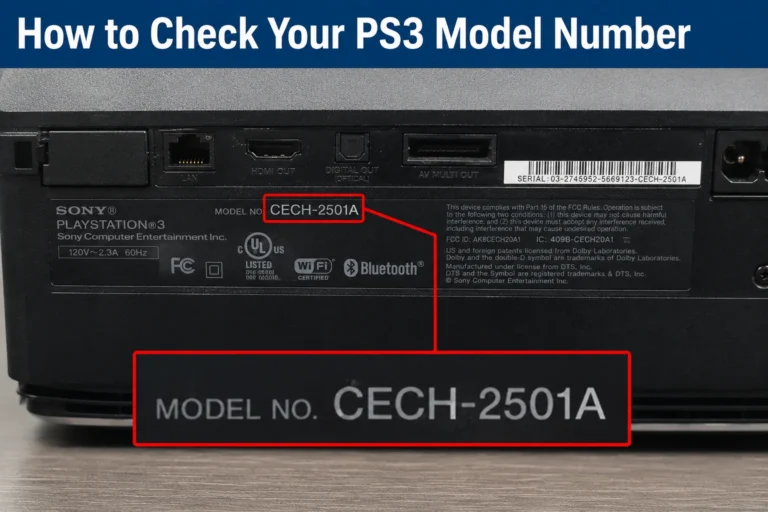
The easiest way to check PS2 compatibility is by finding your PS3 model number. You can usually see it on a sticker located on the back or bottom of the console. Look for a code that starts with “CECH.”
Examples:
- CECHA01
- CECHB01
- CECH-2501A
The first few letters in the CECH code help identify whether your PS3 supports PS2 games or not.
You can also use the USB port method for a quick check. Most backward compatible Fat PS3 models include four USB ports on the front of the console. Later Fat models, Slim models, and Super Slim systems usually only have two.
However, the USB port trick is not fully reliable on its own because some early Fat models still lack full PS2 support. The exact CECH model number is always the best way to confirm compatibility.
How to Play PS2 Games on PS3
There are a few different ways to play PS2 games on PS3 depending on which console model you own. Some systems can run original PS2 discs directly, while others only support digital PS2 classics from the PlayStation Store.
Insert PS2 Disc on Compatible Models
If you own an early backward compatible PS3 model like CECHAxx or CECHBxx, you can insert an original PS2 disc directly into the console and start playing. Most compatible models automatically detect the disc and launch the game without extra setup.
Hybrid compatible models like CECHCxx and CECHExx can also play many PS2 discs, although some games may have small compatibility issues
Buy PS2 Classics from PlayStation Store
Sony also released a limited number of digital PS2 classics through the PlayStation Store. These games can be downloaded and played on many PS3 systems, including models that do not support original PS2 discs.
This means even some non-backward compatible PS3 consoles can still play selected PS2 games digitally.
Use Memory Card Adapter for PS2 Saves
Sony released an official PS3 Memory Card Adapter that lets players transfer save data from original PS2 memory cards to a PS3 console. This is useful for continuing old PS2 save files on backward compatible PS3 systems.
Transferred saves are stored as virtual memory cards on the PS3 hard drive instead of physical PS2 memory cards.
PS2 Games That Do NOT Work on PS3
Even backward compatible PS3 models do not support every PS2 game perfectly. Some titles have serious graphical glitches, crashes, audio problems, or may not boot at all because of compatibility limitations in Sony’s emulation system.
| PS2 Game | Common Issue on PS3 |
|---|---|
| Def Jam: Fight for NY | Random freezing and graphical problems |
| Final Fantasy XI | Online service discontinued |
| Hitman: Blood Money | Visual glitches and instability |
| Jak X: Combat Racing | Save corruption issues on some models |
| Silent Hill 2 | Audio and performance problems |
| Suikoden V | Random crashes during gameplay |
Compatibility is usually best on CECHAxx and CECHBxx models because they include original PS2 hardware. Hybrid compatible systems may experience more issues with certain games.
Can You Use PS2 Memory Cards on PS3?
Yes, but only with Sony’s official PS3 Memory Card Adapter called CECHZM1. This adapter allows players to transfer save files from original PS2 memory cards onto a PS3 system.
The transfer process is simple:
- Connect the adapter to the PS3 through USB
- Insert the PS2 memory card
- Copy saves to a virtual PS2 memory card on the PS3 hard drive
These virtual memory cards are then used for backward compatible PS2 games on PS3.
The adapter mainly works with backward compatible PS3 models that support PS2 games. However, save transfers can still be performed on some later PS3 systems even if they cannot run original PS2 discs.
Is Buying a Backward Compatible PS3 Worth It in 2026?
Backward compatible PS3 models are still popular because they can run original PS2 discs directly, but there are a few important tradeoffs in 2026. Most compatible systems are now very old, and many suffer from overheating, loud fan noise, or hardware failure problems like the Yellow Light of Death.
Prices have also increased because early compatible PS3 models are harder to find in good condition. Fully backward compatible CECHAxx and CECHBxx systems usually cost much more than regular PS3 Slim consoles.
If you want to play PS2 discs on original PlayStation hardware, these older PS3 models can still be a good option. But many players now prefer PCSX2 because it offers modern features, wider game support, and better long-term reliability on newer PCs.
PS3 vs PCSX2 — Which Is Better for PS2 Games?
Both backward compatible PS3 consoles and PCSX2 can play PS2 games, but the experience is very different depending on how you want to play.
| Feature | Backward Compatible PS3 | PCSX2 on PC |
|---|---|---|
| Original PS2 Disc Support | ✅ Yes | ✅ Yes |
| Higher Resolution Support | Limited | ✅ Yes |
| Save States | ❌ No | ✅ Yes |
| Widescreen Patches | Limited | ✅ Yes |
| Controller Customization | Limited | Extensive |
| Physical Console Experience | ✅ Yes | ❌ No |
| Hardware Reliability in 2026 | Aging Hardware | Depends on PC |
| Game Compatibility | Very High | Extremely High |
| Graphics Enhancements | Limited | Advanced |
| BIOS Required | ❌ No | ✅ Yes |
A backward compatible PS3 is a good choice for players who prefer using original hardware and PS2 discs. PCSX2 is better for modern features like save states, graphics enhancements, widescreen patches, and flexible performance settings on PC using a compatible PS2 BIOS file.
PS2 Region Locking on PS3
PS2 games on backward compatible PS3 consoles still follow region locking rules in many cases. This means some PS2 discs only work with PS3 systems from the same region.
For example:
- NTSC-U PS2 games usually work on North American PS3 models
- PAL PS2 games are made for European systems
- NTSC-J games are designed for Japanese consoles
Because of this, a Japanese PS2 disc may not work properly on a USA backward compatible PS3. Digital PS2 classics from the PlayStation Store are less affected because they are tied to your PlayStation account region instead of physical disc regions.
Conclusion
Some PS3 models can play original PS2 games, but compatibility depends entirely on the console version you own. Early Fat PS3 models offer the best backward compatibility, while PS3 Slim and Super Slim systems do not support PS2 discs at all.
If you want the easiest way to play original PS2 discs on PlayStation hardware, a backward compatible PS3 is still one of the best options. For wider compatibility, modern features, and better long-term reliability, many players now use PCSX2 on PC with a compatible PS2 BIOS file.